■ IP 및 인터페이스 정보 확인 명령어
#nmcli |
# nmcli device (+ status도 가능) 네트워크 nic 장비를 보여준다. |
# nmcli device show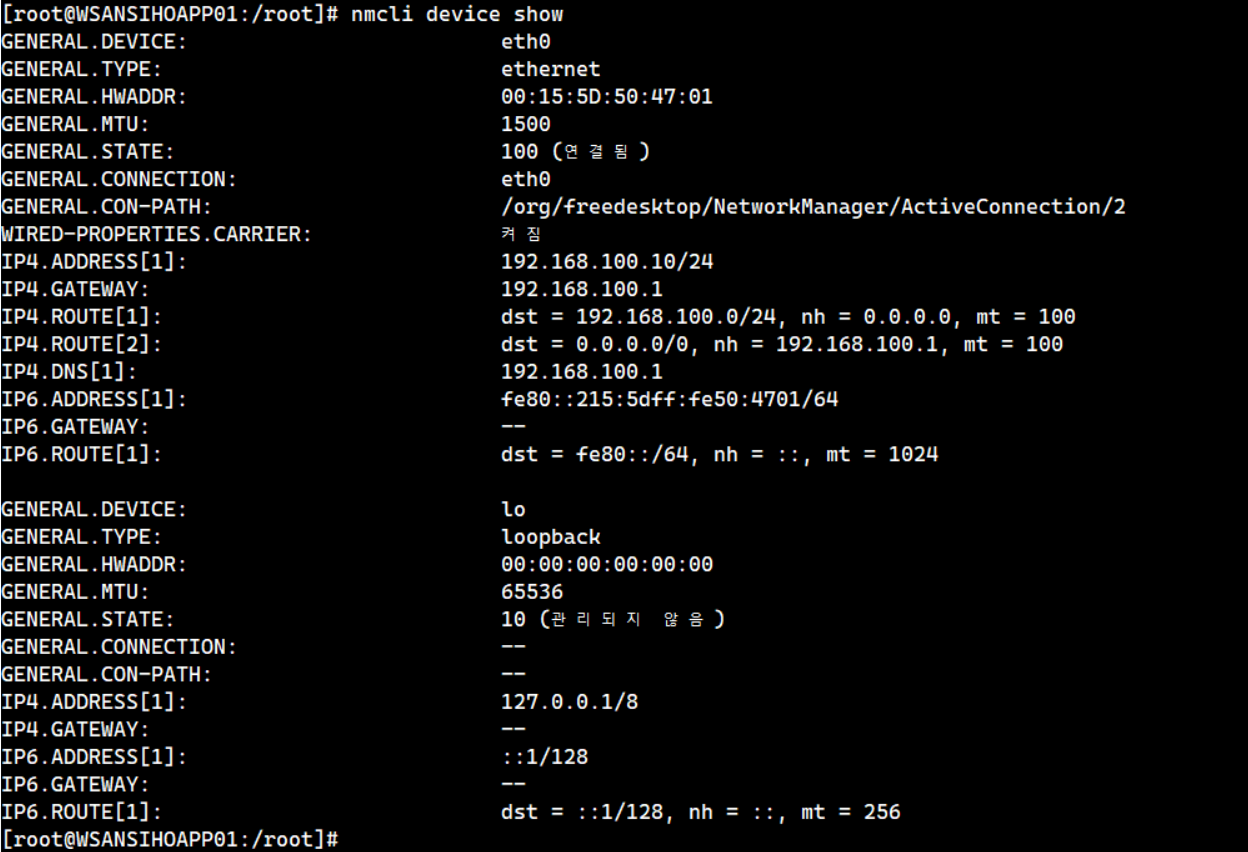 |
# nmcli con show 커넥션 된 인터페이스 정보를 보여준다. |
■ IP 정적 설정 방법
# nmcli con mod eth0 ipv4.method manual ipv4.addresses 192.168.100.10/24 gw4 192.168.100.1 ipv4.dns "192.168.1.254" connection.autoconnect yes
# nmcli connection down eth0 && nmcli connection up eth0 또는 systemctl restart NetworkManager
# nmcli device show
■ IP 설정 변경 (modify)
# nmcli connection modify "eth0" ipv4.dns "8.8.8.8"
# nmcli connection down eth0 && nmcli connection up eth0
# nmcli device show
■ 네트워크 정보 파일 위치
# cat /etc/NetworkManager/system-connections/eth0.nmconnection
[connection]
id=eth0
uuid=19eb8aeb-e4b9-34d5-b515-bcbeaff0fe85
type=ethernet
autoconnect-priority=-999
interface-name=eth0
timestamp=1677484818

[ethernet]

[ipv4]
address1=192.168.100.10/24,192.168.100.1
dns=192.168.100.1;
method=manual

[ipv6]
addr-gen-mode=eui64
method=auto

[proxy]
개인 감상: RHEL7을 주로 쓰다보니 NetworkManager는 정감이 안간다... network-script를 돌려줘!!!
-----------------------------------------------------------------------------------------------------------------------------------------
■아래는 퍼온 자료이다. 기존 RHEL7과의 Network-Script 구문 비교
nmcli 명령어와 ifcfg-* 파일 구문 비교
cli 와 /etc/sysconfig/network-scripts/ifcfg-* 파일 구문을 비교하면 다음과 같다.
| nmcli con mod | ifcfg-* 옵션 | |
| ipv4 아이피 정적으로 설정 | ipv4.method manual | BOOTPROTO=none |
| ipv4 아이피 dhcp로 자동 할당 | ipv4.method auto | BOOTPROTO=dhcp |
| ipv4 아이피 할당 | ipv4.addresses 192.0.2.1/24 | IPADDR=192.168.0.10 PREFIX=24 |
| default gateway 설정 | ipv4.gateway 192.0.2.254 | GATEWAY=192.168.0.1 |
| 해당 네임서버 이용하도록 /etc/resolv.conf 수정 | ipv4.dns 8.8.8.8 | DNS1=8.8.8.8 |
| 부팅할 때 자동으로 connection 활성화 | connection.autoconnect yes | ONBOOT=yes |
| 본 connection 의 이름 | connection.id eth0 | NAME=eth0 |
| 본 connection이 연결된 network interface 지정 |
connection.interface-name eth0 | DEVICE=eth0 |
'리눅스' 카테고리의 다른 글
| Rocky Linux 9에서 Zabbix 6.0 구축 (0) | 2023.05.20 |
|---|---|
| SAN Storage 개념 정리 (0) | 2023.03.21 |
| PCI슬롯 확인과 HBA Card 확인 명령어 (0) | 2023.03.16 |
| nmcli 명령어 사용법: Rocky Linux 9.1_2 (0) | 2023.03.16 |
| Ansible 서버 구축1: HOST 환경 구축 편 (0) | 2023.02.27 |


