■html 코드
<!DOCTYPE html>
<html lang="en">
<head>
    <meta charset="UTF-8">
    <meta http-equiv="X-UA-Compatible" content="IE=edge">
    <meta name="viewport" content="width=device-width, initial-scale=1.0">
    <title>글자색 바꾸기</title>
    <link rel="stylesheet" href="css/text-color.css"/>
</head>

<body>
    <h1 id="heading">안녕 자바스크립트</h1>
    <p id="text">위의 텍스트를 클릭해보세요.</p>
    <script src="js/text-color.js"></script>
</body>
</html>
■CSS 코드
body {
    text-align: center;
}

#heading{
    color:blue;
}

#text {
    color: gray;
    font-size: 15px;
}
■js 코드
//heading변수를 선언하고 h1태그를 저장한 꼴이 되었다.
var heading = document.querySelector("#heading");
//h1태그를 클릭을 하면 글자색깔을 red로 설정하시오.
heading.onclick = function(){
heading.style.color = "red";
}
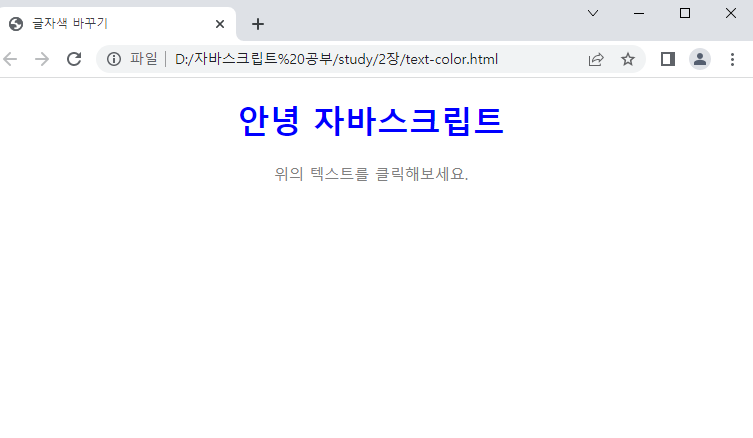
■왼:텍스트 클릭 전 / 오: 텍스트 클릭 후
 |
 |
'개발' 카테고리의 다른 글
| 파이썬3 연차 사용 확인 소스코드 (작성중) (0) | 2023.09.26 |
|---|---|
| 파이썬3 기초 정리 (0) | 2023.07.31 |
| 자바스크립트 실습3 : 연산자 (0) | 2023.02.21 |
| 자바스크립트 실습1: 나이계산기 (0) | 2023.02.11 |
| HTML과 CSS 실습 (0) | 2023.02.11 |


